GST Login:

One of India’s most notable indirect tax reforms is the Goods and Services Tax (GST). It completely altered the national taxation system when it went into effect on July 1, 2017. However, how does GST and GST Login work, and what is it anyway? Allow me to explain it in layman’s words.

What is GST?

The Goods and Services Tax (GST) is essentially just one all-encompassing indirect tax on product and service supply. Excise duty, service tax, VAT (Value Added Tax), and a tangled web of other federal and state taxes were supplanted by it. The fundamental objective was to establish a uniform national tax structure that would facilitate easier trade and commerce.

Get this picture: you’re going to buy something. Before GST, there may have been other hidden taxes included in the amount you paid. The Goods and Services Tax (GST) unifies most of these levies into a single, transparent rate.
GST

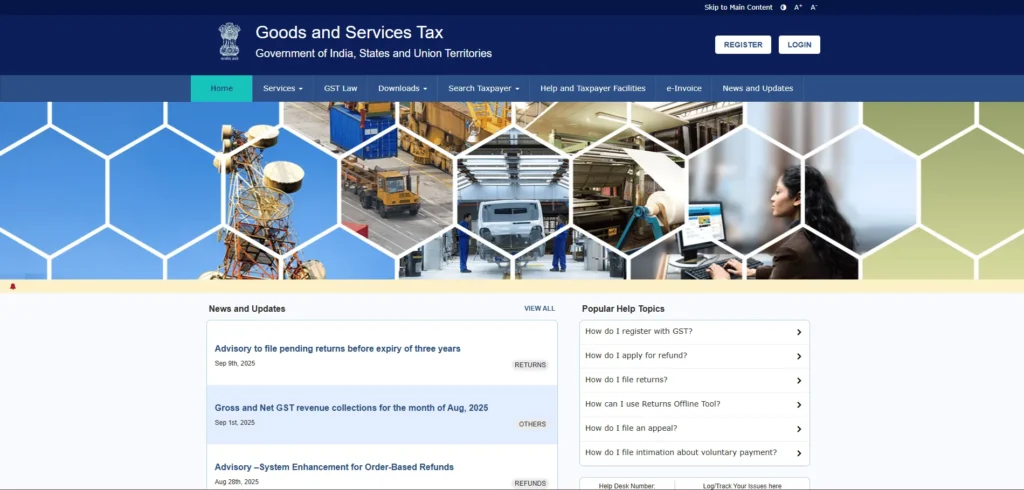
GST Status & Login:

In India, the Goods and Services Tax (GST) is a tax on purchasing and selling products and services.  The new system, which went into effect on July 1, 2017, replaced several indirect taxes with one that was easier to understand and created one big national market.  GST has varying tax rates for different types of goods and services, such as 0%, 5%, 12%, 18%, and 28%.  Businesses are mostly responsible for paying GST, but it also affects the costs that consumers pay.  One of the best things about the system is that businesses may frequently get credit for the taxes they’ve already paid on their purchases, which lowers the amount of tax they have to pay overall.  Businesses must register under GST and file returns regularly to be in compliance.  When transferring products worth more than a specific amount, you need an e-way bill to do so.  There is a simpler way for small businesses to pay their taxes.  Also, items are given specific numbers called Harmonized System of Nomenclature (HSN) codes to figure out what the tax rate is.  GST regulations and rates aren’t set in stone; they can vary from time to time to meet the demands of the market and changes in policy.

The Structure: CGST, SGST, and IGST:

India implements a dual GST system:

  • The Central Government imposes the Central Goods and Services Tax (CGST) on the intra-state supply of goods and services.
  • The State Government imposes the State Goods and Services Tax (SGST) on the supply of goods and services within the same state.
  • The Central Government imposes the Integrated Goods and Services Tax (IGST) on inter-state supply and imports.  The revenue is subsequently distributed between the Center and the destination state.

Key Benefits of GST:

Eliminating the Cascading Effect:

GST addresses the “tax on tax” issue, facilitating input tax credit and lowering overall tax expenses.

Streamlined Tax Framework:

Merges multiple taxes into a single entity, facilitating compliance.

Improved Inter-State Trade:

Promotes seamless trade across state lines with reduced checkpoints.

Increased Tax Base: 

The tax base has expanded as a result of a greater number of registered businesses, leading to an increase in government revenue.

Enhanced Compliance:

Digital procedures for registration, returns, and payment simplify tax adherence.

GST Rates: Slabs and How They Work

The GST system comprises several tax slabs: 0%, 5%, 12%, 18%, and 28%. Basic necessities are subject to lower rates, whereas luxury or undesirable items incur higher rates. Certain items, such as gold, are subject to specific rates (e.g., 3%). The GST Council evaluates and modifies these rates as necessary.

Impact on Consumers and Businesses:

Consumers: In the long run, prices could decrease as cascading taxes are removed.  The effect differs depending on the product or service.

Businesses are experiencing notable transformations in invoicing, accounting, and supply chains.  Managing compliance and input tax credits is crucial.

Challenges and the Way Forward:

  • Initial Adjustment Challenges: Smaller businesses encountered obstacles in adapting to the new system and technology.
  • The intricacies of various rates can result in misunderstandings and disagreements.
  • The necessity for ongoing enhancement: GST is progressing, and continuous reforms are essential to simplify compliance.

GST Login Process:

If you are a first-time user:
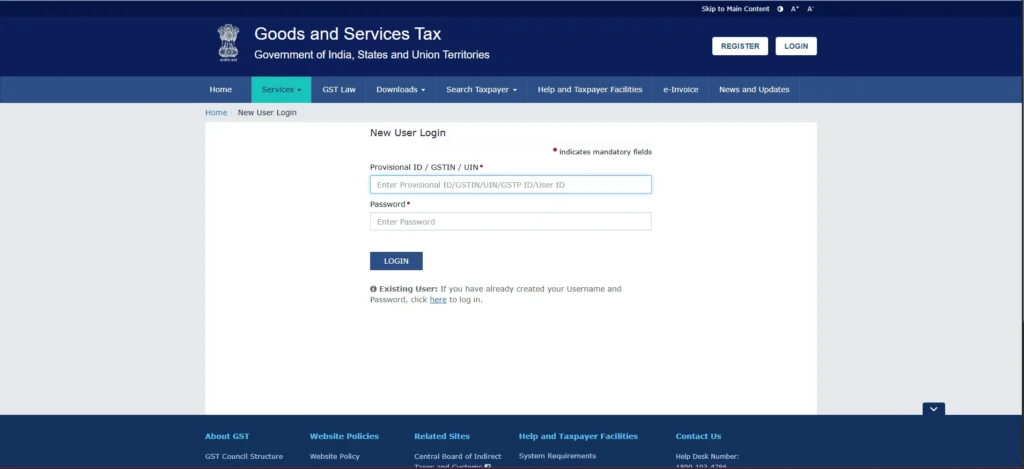
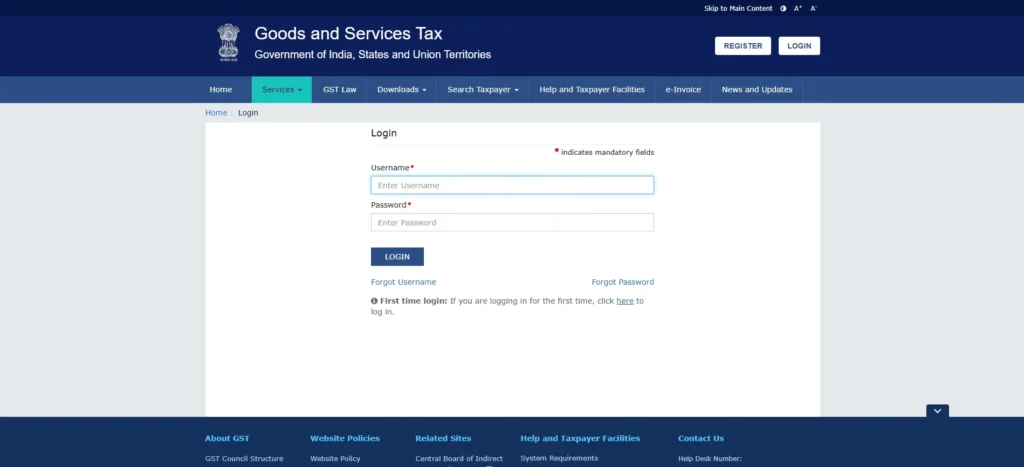
  • Visit the GST portal at: https://www.gst.gov.in/.
  • Select the Login link located in the upper right corner of the homepage.
  • Click the link at the bottom that says, “First time login?”  Click here to log in.
  • Please input your Provisional ID, GSTIN, or UIN along with the password that was sent to you via email.
  • Enter the captcha and select LOGIN.
  • On the New Credentials page, please create your new username and password, confirm the password, and then click SUBMIT.
  • A confirmation message will be displayed.  Please navigate back to the Login page and enter your new credentials to access your account.
First time Login

If you are an existing user:

  • Visit the GST portal at: https://www.gst.gov.in/.
  • Press the Login button located in the upper right corner.
  • Please input your username, password, and captcha, then click on LOGIN.
existing user

GST Registration Process:

registration
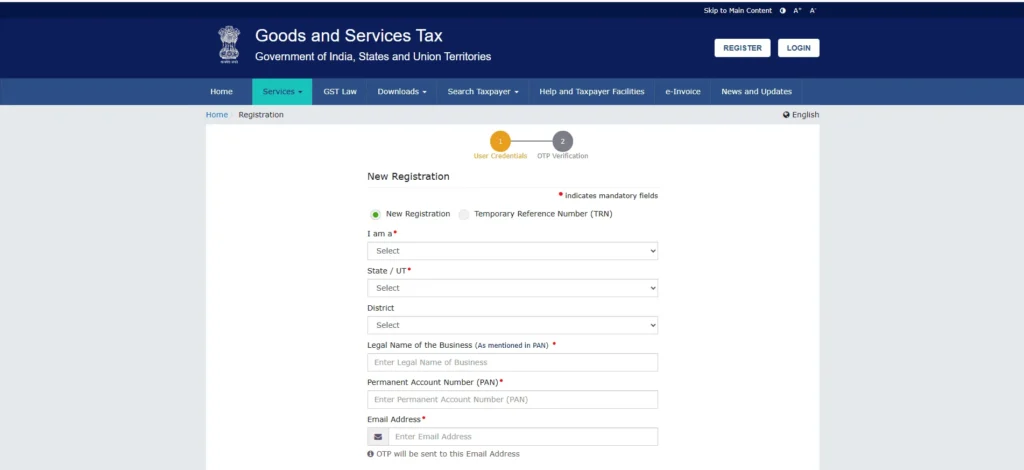
  • New Registration: Navigate to Services > Registration > New Registration or select REGISTER NOW.

Section A – Fundamental Information:

  • Choose Taxpayer from the “I am a” dropdown menu.
  • Select your State/UT and District.
  • Please provide the Legal Name of the Business along with the PAN.
  • Please provide the email address and mobile number of the primary authorized signatory.
  • Please enter the captcha and click on PROCEED.
  • Please verify the linked IDs and then click on PROCEED.
gstt

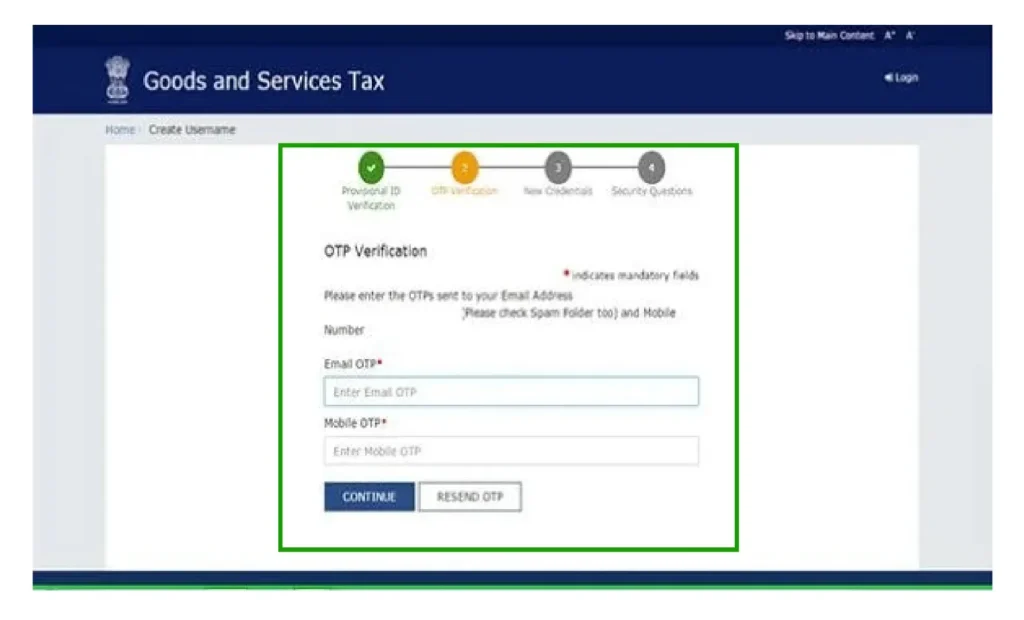
OTP Verification:

Please enter the OTPs that have been sent to your email and mobile, and then click on PROCEED.
gst registration

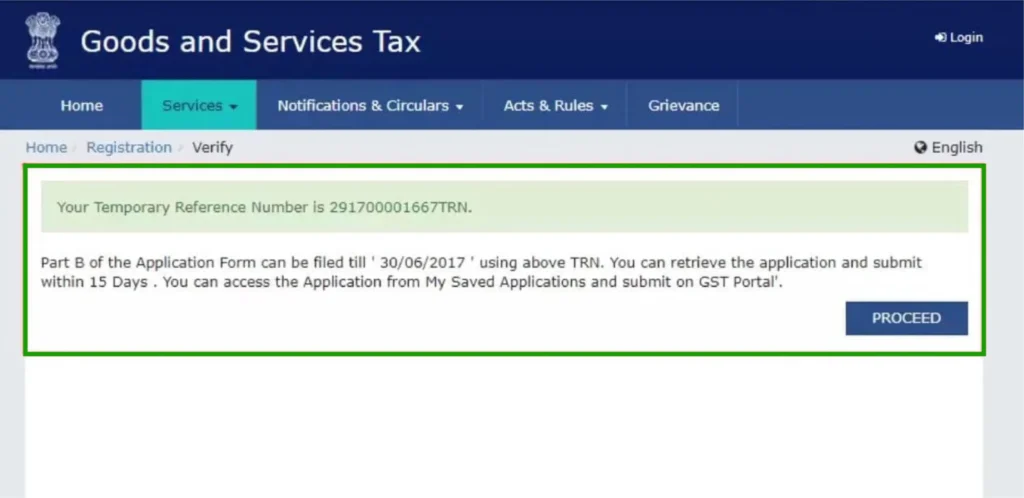
Temporary Reference Number (TRN):

Please be aware of the TRN that has been sent to your email and mobile device.

Part B – Detailed Information:
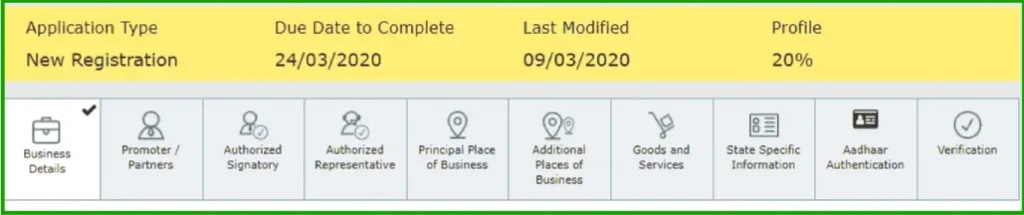
gst log
  • Navigate back to the GST portal and choose Temporary Reference Number (TRN).
  • Input the TRN and captcha, then select PROCEED.
  • Please enter the OTP that has been sent again and click on PROCEED.
  • Select the Edit icon adjacent to the “Drafts” status.
gst reg

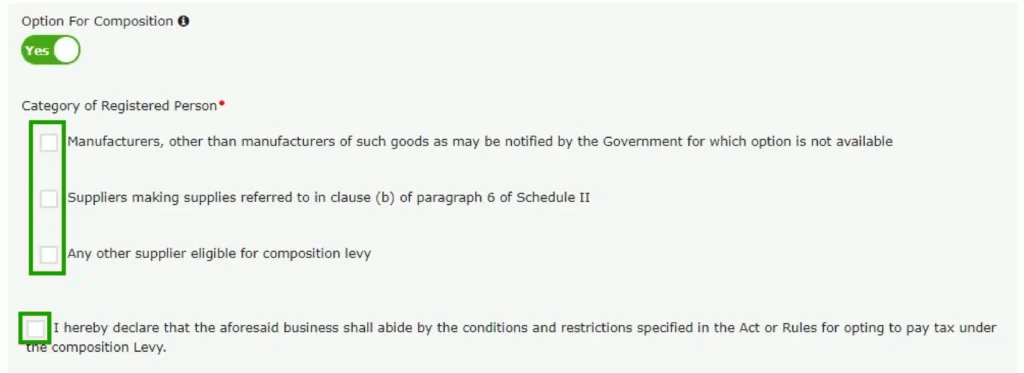
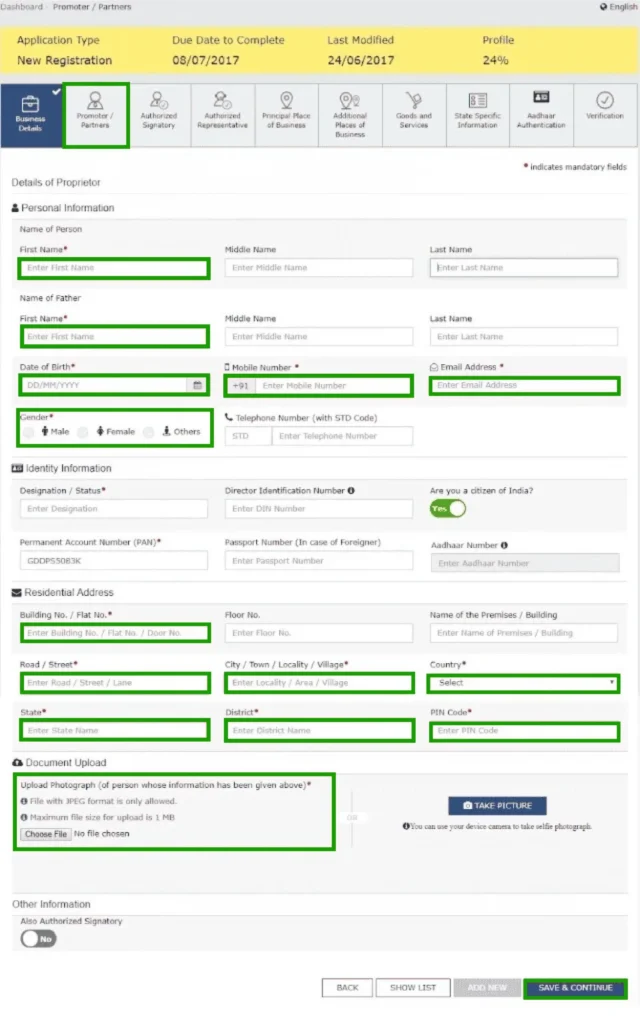
Please complete the sections of the application form as follows:
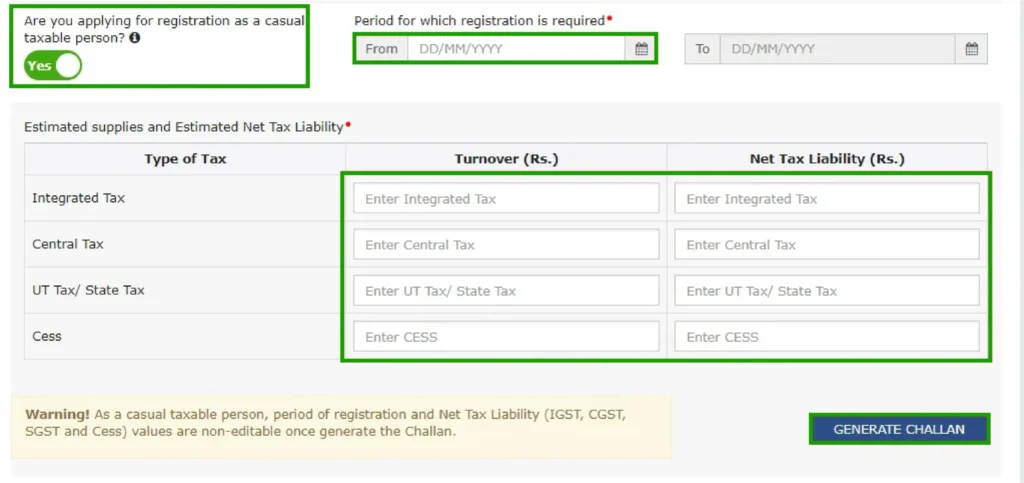
  • Business Details, Promoter/Partners Details
  • Details of the Authorized Signatory
  • Primary Business Location Supplementary Business Locations
  • Description of Goods and Services
  • Information Specific to the State
  • Aadhaar Authentication (optional) Verification
gst loginn

Please upload the necessary documents: PAN card, address proof, bank details, photographs, and so on.

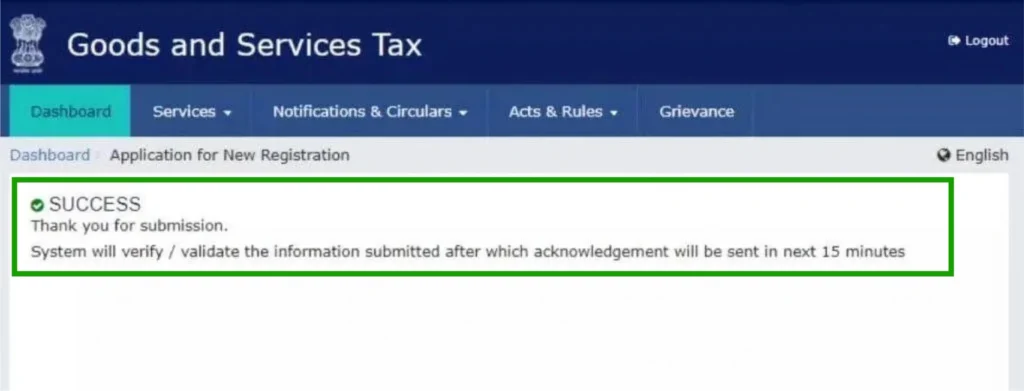
Submit via DSC or EVC.
sso id raj

Your registered email and mobile will receive the ARN shortly.

The GST officer reviews your application and supporting documents for verification.

Once approved, you will be issued your GSTIN along with the Registration Certificate (Form GST REG-06).
rajasthan

Ensure that you have all necessary documents readily available before you begin. The requirements for documentation can differ depending on the type of business.
gst
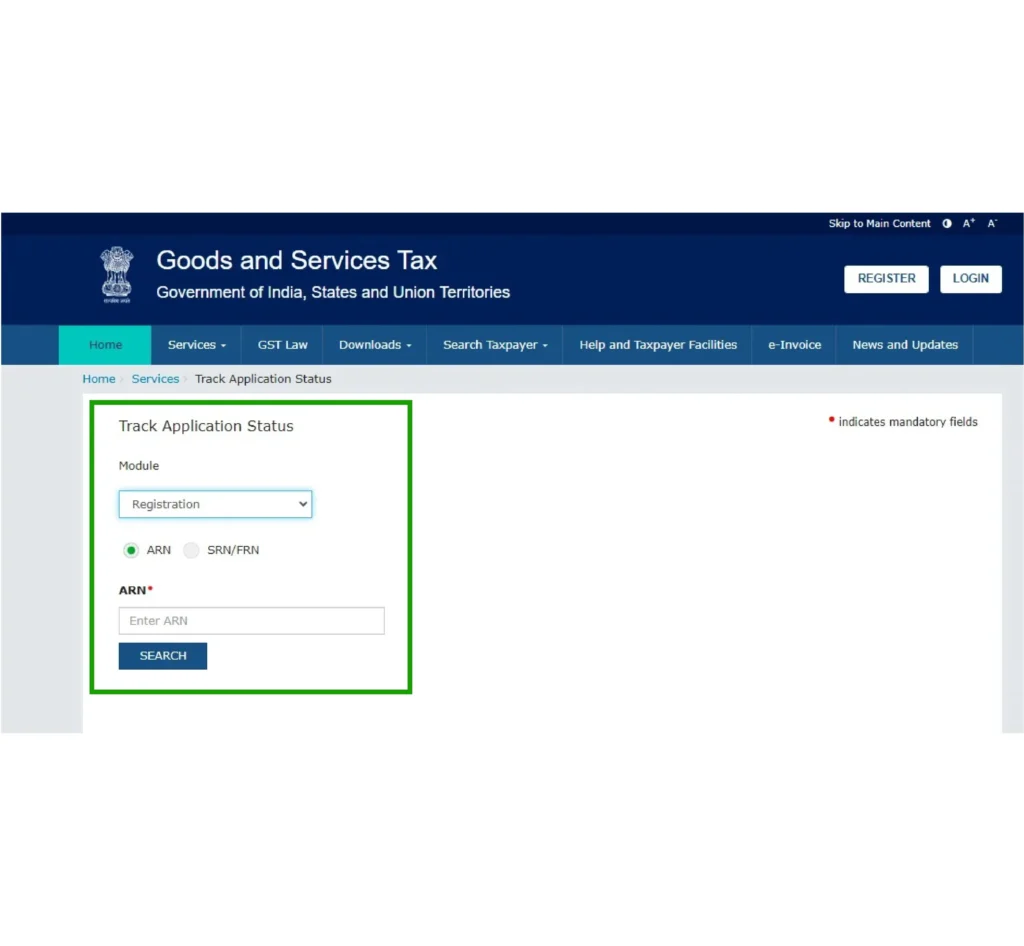
  • Visit the GST Portal: https://www.gst.gov.in/ Proceed to Track Application Status:
  • Select the Services tab, then navigate to Registration, and click on Track Application Status.
  • Alternatively, you can locate a direct link to “Track Application Status” on the homepage.
  • Choose Module: Select Registration from the dropdown menu.
  • Please provide the necessary information:
  • Select the TRN option if you are using TRN.
  • Please provide your TRN along with the captcha code.
  • Press the Search button
  • Select the option for ARN
  • Please input your ARN along with the captcha code.
  • Select the Search option.
  • Check Status: Your GST registration application status will be shown here.

Checking Status After Login (Using ARN or Submission Period)

  • Access the GST Portal: Please navigate to https://www.gst.gov.in/ and enter your credentials to log in.
  •  Access the Application Status Tracker: Select the Services tab and then choose Track Application Status.
  • Choose Module: Select Registration.
  • Please provide the necessary information:
  • To use the ARN, simply enter it and then click on Search.
  • To use the Submission Period, input the date range and then click on Search.
  • The status of the application will be displayed.  Click on the ARN to download the acknowledgement PDF if it is available.

Possible Application Statuses:

  • Currently under review: Awaiting assessment by the Tax Officer.
  • Awaiting Clarification: Further information or documents needed. Please review the notices available on the portal.
  • Clarification Submitted, Awaiting Order: Clarification has been submitted and is now pending review by the officer.
  • Application has been approved; GSTIN and certificate have been issued.
  • Application has been rejected; please refer to the status details or notice for the reason.
  • Your application has been withdrawn.
  • Verification of the Site Application designated for site verification.
  • Verification of Site Verification has been completed, and the report has been submitted.

It is advisable to monitor your status frequently and promptly address any requests for clarification to prevent any potential delays.

In Conclusion:

The Goods and Services Tax (GST) in India represents a pivotal tax reform that has profoundly altered the economic landscape. Despite facing initial challenges, the long-term advantages of establishing a unified market, streamlining taxation, and alleviating the tax burden are clear. As the system evolves and additional enhancements are implemented, GST will remain a crucial factor in India’s economic growth and development. Being aware of the most recent GST rules and regulations is essential for businesses and consumers alike to effectively navigate this changing system.

Frequently Asked Questions:

GST represents Goods and Services Tax. It is a tax imposed on the provision of goods and services in an indirect manner.

Businesses that surpass the aggregate turnover threshold (₹40 lakh for goods and ₹20 lakh for services, with certain exceptions) and those engaged in inter-state supply, among other criteria.

The four primary types are CGST (Central GST), SGST (State GST), IGST (Integrated GST), and UTGST (Union Territory GST).

The GST portal serves as the official website for activities related to GST, including registration, return filing, and payment processing.

The GST Council determines the GST rates, which are organized into various slabs: 0%, 5%, 12%, 18%, and 28%.

The GST portal is an online platform that facilitates various services related to the Goods and Services Tax (GST) in India. It allows taxpayers to register, file returns, and manage their GST-related activities efficiently.
The GST portal serves as the official website for activities related to GST, including registration, return filing, and payment processing.

E-invoicing under GST refers to the electronic generation and reporting of invoices for goods and services. It aims to streamline the invoicing process, enhance compliance, and reduce tax evasion by mandating businesses to generate invoices in a specified format and upload them to a government portal for validation. E-invoicing refers to the electronic creation of invoices through a unified GSTN portal for businesses that surpass a designated turnover limit.

GST returns are regular submissions (monthly, quarterly, or annually) that outline a taxpayer’s sales, purchases, and tax obligations.

ITC enables businesses to lower their tax obligations by claiming credit for GST paid on purchases utilized in their operations.

GST payments can be made online through the GST portal using net banking, credit or debit cards, NEFT/RTGS, or offline at authorized banks.